cat restarting-a-vpn-client-on-pfsense.md
Restarting a VPN client on pfSense through the CLI (SSH)
I recently had some issues with a flaky VPN service. I wanted to make a little script I could run on a different machine that would restart the VPN connection, should it break. This particular VPN connection included a DNS service for the remote .local-domain, which I decided to use for testing, but you could in theory use any valid connection test.
Either way, pulling the correct function names and options from /usr/local/www/status_services.php - following the reference to /etc/inc/service-utils.inc - I came up with this script:
#!/usr/bin/env bash
if ! nslookup -timeout=2 remote.server.local >/dev/null 2>&1; then
    echo "VPN not OK - restarting"
    ssh my.pfsense.ip /usr/local/bin/php -q <<-EOF
        <?php
            include('service-utils.inc');
            service_control_restart("openvpn", array('vpnmode' => 'client', 'id' => '3'));
        ?>
    EOF
fiThis will connect to my pfSense box using passwordless SSH login from a trusted machine, and restart the VPN connection.
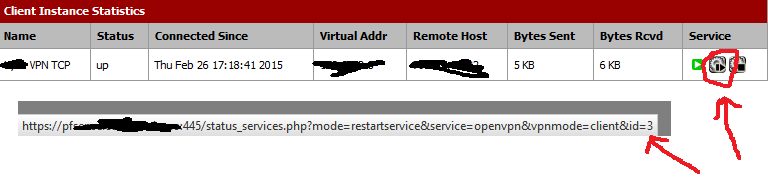
The client ID was obtained from the restart link in the pfSense web interface:
Note
UPDATE: I ended up finding the browser VPN ID too hackish, and made a script that looks up the ID in the pfSense config instead. Might also be useful for adapting to future issues. Here: /projects/files/stuff/bash/pfsense-vpnreset
Comments