cat automatic-windows-logon-on-domain-member-machines.md
Automatic Windows Logon on Domain Member Machines
On a Windows machine, you can normally use Start => Run => control userpasswords2 to enable automatic login for a given user when the system boots. On computers that are part of a domain, this is not the case. However, while the functionality is removed from the user interface when you join a domain, it is still available if you're comfortable mucking about with the registry.
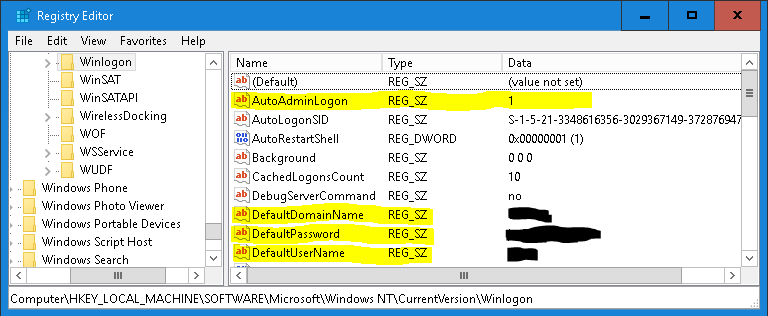
Using Regedit, go to Computer\HKEY_LOCAL_MACHINE\SOFTWARE\Microsoft\Windows NT\CurrentVersion\WinLogon.
There are 4 keys you need to set to allow automatic logon:
- AutoAdminLogon, REG_SZ => 1
- DefaultDomainName, REG_SZ => YourDomainNameHere
- DefaultPassword, REG_SZ => YourSecretPasswordInClearText
- DefaultUserName, REG_SZ => YourUserName
Add or edit the keys to match your domain setup and reboot. Autologin should function as intended after this.
Comments