cat understanding-mcelog-ecc-errors-which-stick-of-ram-is-broken.md
Understanding mcelog ECC errors - Which stick of RAM is broken?
Before reading this, please note that much of the information in mcelog is hardware dependent. Your mileage may vary.
Memory gone bad
So one of the servers, running an X99-WS/IPMI board from Asus, began putting errors into /var/log/mcelog. Thankfully, they were all the same, telling me the following:
mcelog: failed to prefill DIMM database from DMI data
Hardware event. This is not a software error.
MCE 0
CPU 0 BANK 11
MISC 90840080008228c ADDR 9ce494000
TIME 1499161840 Tue Jul 4 09:50:40 2017
MCG status:
MCi status:
Corrected error
MCi_MISC register valid
MCi_ADDR register valid
MCA: MEMORY CONTROLLER MS_CHANNEL2_ERR
Transaction: Memory scrubbing error
MemCtrl: Corrected patrol scrub error
STATUS 8c000051000800c2 MCGSTATUS 0
MCGCAP 7000c16 APICID 0 SOCKETID 0
CPUID Vendor Intel Family 6 Model 79So, what does this mean?
The first few lines tell us this happened from CPU 0 on BANK 11. This wasn't much help, as the board only has 8 memory banks. It was suggested in #debian on freenode that the high bank number might be due to dual channel memory, but then how do I pinpoint the physical stick?
Enter dmidecode
mcelog tells us a weird bank number, but it has something else that's vitally important; the address. ADDR 9ce494000 is a memory address on the faulty stick, and dmidecode can tell us which stick is responsible for that address:
# dmidecode -t 20
[...snip...]
Handle 0x005E, DMI type 20, 35 bytes
Memory Device Mapped Address
    Starting Address: 0x00800000000
    Ending Address: 0x00BFFFFFFFF
    Range Size: 16 GB
    Physical Device Handle: 0x005D
    Memory Array Mapped Address Handle: 0x0058
    Partition Row Position: 1
[...snip...]This should be the problematic RAM stick, as address 0x009CE494000 is between 0x00800000000 and 0x00BFFFFFFFF. The stick has "Physical Device Handle" 0x005D. dmidecode can show us more information about this handle:
# dmidecode -t 17
[...snip...]
Handle 0x005D, DMI type 17, 40 bytes
Memory Device
    Array Handle: 0x0057
    Error Information Handle: Not Provided
    Total Width: 72 bits
    Data Width: 72 bits
    Size: 16384 MB
    Form Factor: RIMM
    Set: None
    Locator: DIMM_B1
    Bank Locator: NODE 1
    Type: DDR4
    Type Detail: Synchronous
    Speed: 2133 MHz
    Manufacturer: Samsung
    Serial Number: 32BFE65D
    Asset Tag: DIMM_B1_AssetTag
    Part Number: M393A2G40DB0-CPB
    Rank: 2
    Configured Clock Speed: 2133 MHz
    Minimum Voltage: Unknown
    Maximum Voltage: Unknown
    Configured Voltage: Unknown
[...snip...]Here you can look at the Locator, or the Asset Tag fields. Both show the memory slot as DIMM_B1. Now that's something we can use! Looking in the motherboard manual, available online, one can see where DIMM_B1 is:
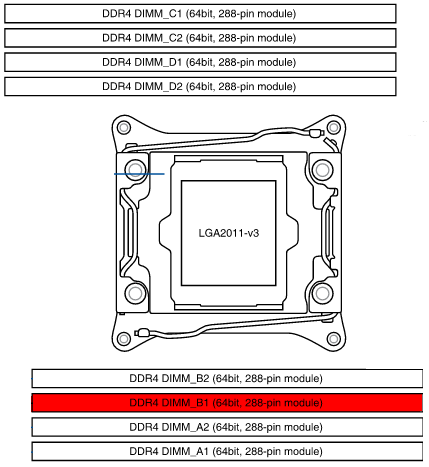
So that's the bad stick, which will be going back to the supplier with an RMA.
Comments