cat the-intel-82579v-on-hyper-v-server-2016.md
The Intel 82579V on Hyper-V Server 2016, installing unsupported network adapters
Repurposing an old developer machine to run some light VM's, I was tasked with getting Hyper-V Server running on the Asus Maximus V GENE motherboard. Simple enough. Download Hyper-V for free from Microsoft, format a USB stick with FAT32, put all the files from the .ISO on the stick, install.
Diskpart Cheat Sheet
 1) Open the command prompt as Administrator
 2) "diskpart"
 3) "list disk"
 4) Enter the number of the USB drive
 5) "clean"
 6) "create partition primary"
 7) "active"
 8) "format fs=fat32 quick"
 9) "assign"
10) "exit"But hey, no network! :(
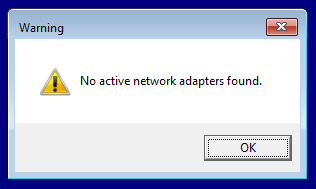
"No active network adapters found." eh?
Tuns out Intel isn't a particularly big fan of people running servers on their consumer gaming boards, but not wanting to wait for a new NIC to be delivered, it was time to hit Google.
I came up with these links:
- https://www.iarp.ca/blog/8-hyper-v-and-the-intel-82579
- https://jayrbarrios.com/2014/11/19/intel-nuc-d54250wykh-installing-lan-driver-on-windows-hyper-v-server-2012-r2/
So I followed the instructions, but switched out the drivers for the latest ones and the OS for Hyper-V 2016.
NDIS reference
A short reference to Intel's Windows driver naming scheme
| Directory | Desktop OS | Server OS |
|---|---|---|
| NDIS62 | Windows 7 | Server 2008 |
| NDIS63 | Windows 8 | Server 2012 |
| NDIS64 | Windows 8.1 | Server 2012 R2 |
| NDIS65 | Windows 10 | Server 2016 |
Driver Installation
1 => The latest Intel networking drivers, intended for Windows Server 2016, are available here (local archive). Downloaded and extracted with 7-Zip.
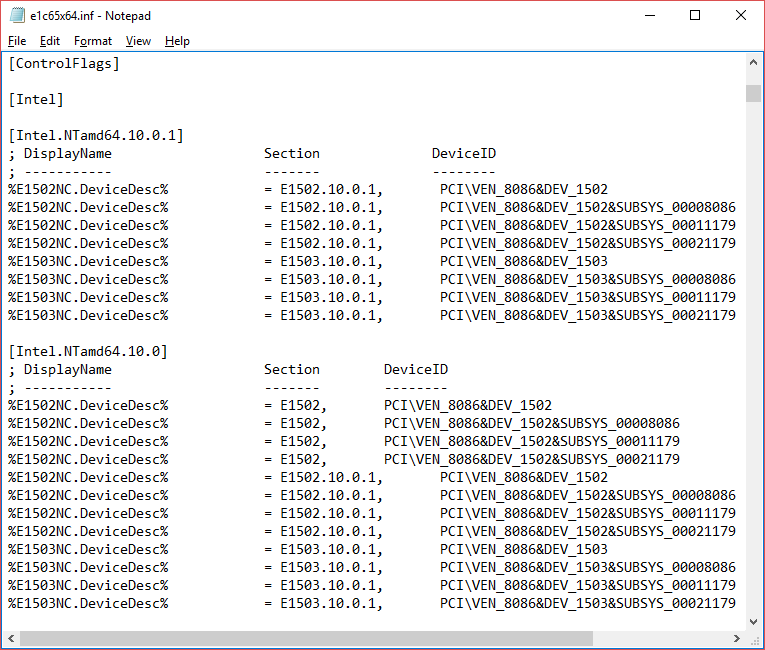
2 => Edited the file PROWinx64\PRO1000\Winx64\NDIS65\e1c65x64.inf, removing the lines under [ControlFlags] and copying the E1502NC lines to the next section as described in the links I found. It ended up looking like this:
3 => Disabled the driver signing, as the signature will now be invalid
bcdedit /set LOADOPTIONS DISABLE_INTEGRITY_CHECKS
bcdedit /set TESTSIGNING ON
bcdedit /set NOINTEGRITYCHECKS ON4 => Rebooted (IMPORTANT)
5 => Put the driver folder on a USB stick, and installed it from the shell
X:
cd \PROWinx64\PRO1000\Winx64\NDIS65
pnputil -i -a e1c65x64.inf6 => Agreed to the popup warning about installation of unsigned drivers
7 => Rebooted (IMPORTANT)
8 => Considered restoring the driver signing options with bcdedit, and then ignored it as I had better things to do
That's it. If you're uncomfortable modifying the .inf file yourself, you can download my already "unlocked" copy here: PROWinx64.zip
Comments