cat enable-username-and-password-in-url-in-internet-explorer.md
Enable username and password in URL in Internet Explorer
After IE6, usernames and passwords in URL's are no longer enabled by default in Internet Explorer, the reasoning being that saving usernames and passwords in the browser history and referral headers is a very, very bad idea. Still, it's sometimes needed, especially when dealing with old IP cameras, which is when I last bumped into this issue.
If you're not sure what I'm on about, I'm referring to links like these: http://user:pass@example.com/
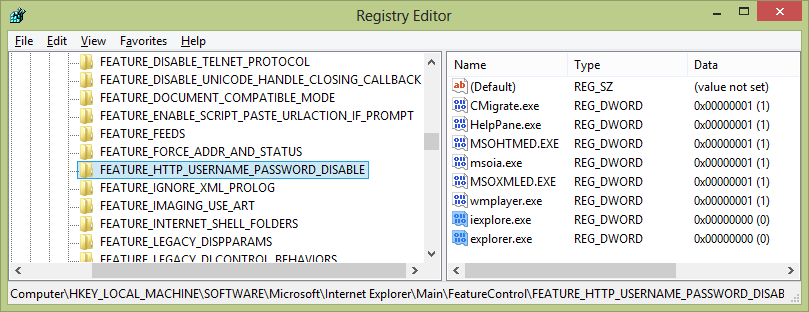
To re-enable this feature:
- Open RegEdit (Start->Run->"regedit")
- Navigate to
[HKEY_LOCAL_MACHINE\Software\Microsoft\Internet Explorer\Main\FeatureControl\FEATURE_HTTP_USERNAME_PASSWORD_DISABLE]. - Create two new REG_DWORD values, set to 0, named "iexplore.exe" and "explorer.exe"
- Reboot
Comments