cat bashdb-a-single-dynamic-database-table-for-bash-scripts.md
BashDB, a single dynamic database table for bash scripts
I write shell scripts. A lot of them. I automate everything with scripts. Many of these scripts need to have some notion of a state. The state needs to be persistent. How do we do that? And could we draw some retro flashback line character table borders while we're at it?
The problem
If I have some sort of a watchdog running every 5 minutes, I may not want to get an email about it until it has failed 12 times, or continuously for 60 minutes. I could run my script continuously and just sleep, or I could store the "fail count" in some file and read it back in on the next iteration. I often opt for the latter, and I used to find myself re-implementing pretty much the same tab separated, line separated, or null separated storage algorithms over and over.
Then come the lists. Say I have a script that's supposed to verify that a couple of URL's are online. Where do I store those? One per line in a file? I name it script.conf and put it somewhere? That's fine, but what if I want to also store the last time each URL failed, so I can include more information in a report? Tab separated "columns"? A different file for the dates? Should I use a simple database, such as SQLite? That seems like a bit of an overkill, and it might not be installed where the script is supposed to be running.
Solution
Enter BashDB, written in the car going to and from a weekend trip at the cottage. It stores a single table, with a simple Key=>Value structure, or named columns. It dynamically adds new columns as requested, supports list values in any column, supports binary data, and it's all written in Bash with very few external dependencies.
It can be downloaded --> HERE
View the manual --> HERE (or run db_help after sourcing the library)
Reference
To use bashdb, simply source it in the top of your script and use the provided db_* functions:
db_help: The equivalent of running each function, in turn, with the -? option. Shows the help :)db_columns: Lists the columns currently in the tabledb_copy_row: Copies a row with a given key to another row, optionally overwriting it if it existsdb_delete: Deletes a row with a given keydb_delete_column: Deletes one column of data from all rowsdb_dump: Provides a somewhat pretty display of the data currently in the tabledb_get: Gets a single value from the tabledb_has_key: Returns whether or not a given key existsdb_has_column: Returns whether or not a given column existsdb_keys: Lists the keys in currently in the tabledb_rename: Changes the key of a rowdb_rename_column: Renames a columndb_search: Lists keys or dumps data matching a search regex in a given columndb_selftest: Runs a unit test of most featuresdb_set: Sets a value on a keydb_testdb: Generates a small test databasedb_trim: Removes any empty columns
Examples
To try out the functionality, one can also use the script from the console, as such:
$ source ./bashdb
$ ls test
ls: cannot access test: No such file or directory
$ # we don't have a "test" yet :)Adding a key and a value:
$ db_set
Error: db_set: Missing parameter: -f <file>
$ db_set -f test
Error: db_set: Missing parameter: -k <key>
$ db_set -f test -k Key1 -v Value1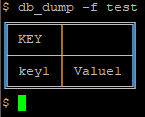
Adding some more keys, and changing the value for key1:
$ db_set -f test -k "Norwegian Characters" -v "Ææ" -v "Øø" -v "Åå"
$ db_set -f test -k key1 -v "Value2"
$ db_set -f test -k key9 -v "Day[9]"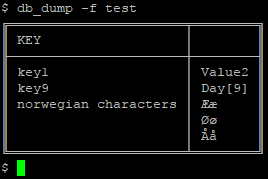
The "Norwegian Characters" is an example of storing a list. Lists can be read back out, either "human readable" -h, or null byte (\0) separated:
$ db_get -f test -k "norwegian characters"
ÆæØøÅå$ db_get -f test -k "norwegian characters" -h
Ææ
Øø
Åå
$ db_get -f test -k "norwegian characters" -h | while read -r c; do echo "--> $c <--"; done
--> Ææ <--
--> Øø <--
--> Åå <--We can unset values by setting a value to an empty string, "", or by simply not including the -v switch at all, when calling db_set. A row will be removed entirely if all its values are unset.
Lists (which are actually any value at all), support the -m switch, followed by "add" or "remove" to modify the list:
$ db_set -f test -k key1
$ db_set -f test -k "norwegian characters" -v "Øø" -v "Åå" -m remove
$ db_set -f test -k key9 -m add -v "Day[10]"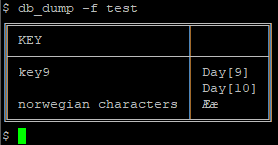
Without specifying -c, a default unnamed column is used for the data. However, columns can be added dynamically to include more information about each key:
$ db_set -f test -k key9 -c "Additional" -v "Test Value"
$ db_set -f test -k key9 -c "Additional 2" -v "More stuff" -v "Here"
$ db_set -f test -k new -c "Additional 2" -v "Not all columns need to be filled"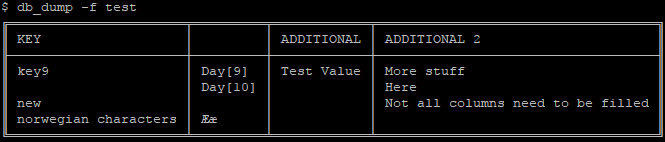
Column data can be requested by using -c on db_get. Also showing an example of -d, giving a default value if none is set, as for key=>new, column=>additional:
$ db_get -f test -k key9 -c "additional 2" -h
More stuff
Here
$ db_get -f test -k new -c "additional" -h -d "This is the default"
This is the default
$Taking a short break to run the unit tests:
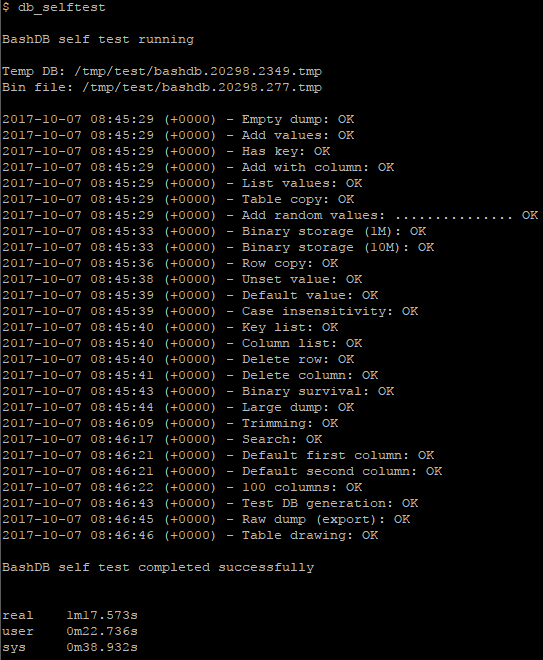
We can easily delete a row, or an entire column:
$ db_delete -f test -k new
$ db_delete_column -f test -c additional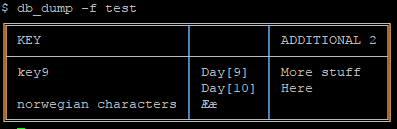
Listing keys and columns, also with the -h option, since we're showing it here. The default column shows as an empty line.
$ db_keys -f test -h
norwegian characters
key9
$ db_columns -f test -h

additional 2We can also store values from stdin, for instance a web server response. This even works with binaries, though I wouldn't recommend trying db_dump on tables containing those. Not that it breaks, it just looks like crap.
$ curl "https://google.com/" | db_set -f test -k "Response from google.com" -i
% Total % Received % Xferd Average Speed Time Time Time Current
Dload Upload Total Spent Left Speed
100 269 100 269 0 0 5458 0 --:--:-- --:--:-- --:--:-- 5489
$ db_get -f test -k "response from google.com"
<HTML><HEAD><meta http-equiv="content-type" content="text/html;charset=utf-8">
<TITLE>302 Moved</TITLE></HEAD><BODY>
<H1>302 Moved</H1>
The document has moved
<A HREF="https://www.google.no/?gfe_rd=cr&dcr=0&ei=ej7bWYqlOuLk8AfSmqqoDg">here</A>.
</BODY></HTML>When dumping a table for display, values are truncated. Please note that if you're storing binary data, the displayed length by db_dump will only include the printable characters, and will not accurately reflect the length of the binary that would be retrieved by db_get.

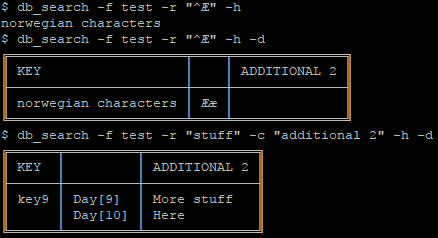
Searching is done using a regex on a given column, optionally running db_dump on the results instead of listing the keys:
If you decide to use this for your own projects, and you're having issues, please read the output of db_help first, or run the function you're having issues with using the -? switch. Or simply ask me here.
Have fun :)
Comments